
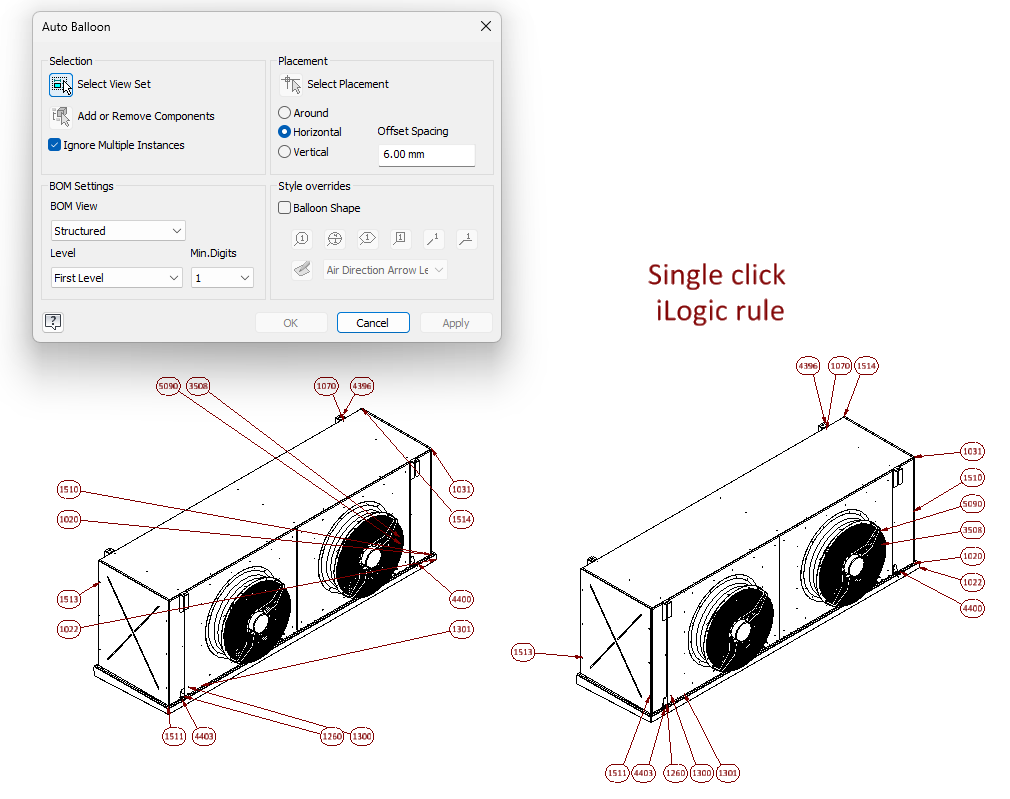
Inventor’s Auto Balloon tool is useful for generating balloons, but it is primarily designed as an interactive feature. In practice, this means working through a dialog, adjusting settings, and repeating those steps for each view. I built a iLogic rule that focuses on a different approach: a fast, single‑click action that produces a clean, predictable result without any dialog or manual tuning.
This makes it practical, not only for day‑to‑day work, but also for automated processes. Since the built‑in Auto Balloon function is not exposed through the API, having a scriptable alternative becomes especially useful in those scenarios.
The generated layout follows the same general idea as the default tool, with a few small adjustments to keep balloons closer to their parts and to maintain a structured result.
The individual improvements are modest. The main benefit is usability: a reliable, one‑click workflow that fits naturally into both manual use and automation.
Using the rule
- Copy the code into an external iLogic rule.
- (Optional) Add a ribbon button or shortcut to run it.
- Autodesk’s guide: How to add a rule to the ribbon.
- ButtonConstructor
- Run the rule
- select a drawing view, and wait for placement to complete.
Notes: Drawings with a large number of drawing curves may take longer because the rule evaluates candidate edges to find a clean attachment point per part.
Public Class ThisRule
            Private Property DistanceFromEdge As Double = 2
            Private Property minimalDistanceBetweenBaloons As Double = 1.4

    Private Enum Edge
        Top
        Bottom
        Left
        Right
    End Enum

    Sub Main()
        Dim doc As DrawingDocument = ThisDoc.Document
        Dim sheet As Sheet = doc.ActiveSheet
        Dim view As DrawingView = ThisApplication.CommandManager.Pick(SelectionFilterEnum.kDrawingViewFilter, "Select a drawing view.")

        Dim tagCurves = CollectClosestCurvePerFile(view)
        PlaceBalloons(doc, sheet, view, tagCurves)
    End Sub

    Private Function CollectClosestCurvePerFile(view As DrawingView) As List(Of TagCurve)
        Dim viewTop = view.Top
        Dim viewBottom = view.Top - view.Height
        Dim viewLeft = view.Left
        Dim viewRight = view.Left + view.Width

        Dim byFile As New Dictionary(Of String, TagCurve)

        For Each curve As DrawingCurve In view.DrawingCurves.Cast(Of DrawingCurve)()
            ' This only works with edges
            Try
       			If TypeOf curve.ModelGeometry IsNot EdgeProxy Then Continue For
            Catch
                   Continue For
            End Try

            Dim tagCurve As New TagCurve(curve)
            If tagCurve.Occ.OccurrencePath.Count > 2 Then Continue For

            ' Closed curves (circles, ellipses) have no midpoint — fall back to the center.
            Dim midPoint As Point2d = curve.MidPoint
            If midPoint Is Nothing Then midPoint = curve.CenterPoint

            tagCurve.DistanceToNearestViewEdge = MinDistanceToViewEdge(midPoint, viewTop, viewBottom, viewLeft, viewRight)

            Dim existing As tagCurve = Nothing
            If Not byFile.TryGetValue(tagCurve.FileName, existing) OrElse tagCurve.DistanceToNearestViewEdge < existing.DistanceToNearestViewEdge Then
                byFile(tagCurve.FileName) = tagCurve
            End If
        Next

        Return byFile.Values.ToList()
    End Function

    Private Shared Function MinDistanceToViewEdge(midPoint As Point2d, top As Double, bottom As Double, left As Double, right As Double) As Double
        Return Math.Min(
            Math.Min(Math.Abs(top - midPoint.Y), Math.Abs(bottom - midPoint.Y)),
            Math.Min(Math.Abs(left - midPoint.X), Math.Abs(right - midPoint.X))
        )
    End Function

    Private Sub PlaceBalloons(doc As DrawingDocument, sheet As Sheet, view As DrawingView, tagCurves As List(Of TagCurve))
        Dim transientGeom = ThisApplication.TransientGeometry
        Dim balloonDiameter = doc.StylesManager.ActiveStandardStyle.ActiveObjectDefaults.BalloonStyle.BalloonDiameter

        Dim viewTop = view.Top + DistanceFromEdge
        Dim viewBottom = view.Top - view.Height - DistanceFromEdge
        Dim viewLeft = view.Left - DistanceFromEdge
        Dim viewRight = view.Left + view.Width + DistanceFromEdge

        ' Phase 1: assign each curve to its closest edge and compute the desired leader endpoint.
        Dim placements As New List(Of Placement)
        For Each tagCurve As TagCurve In tagCurves
            ' Closed curves (circles, ellipses) have no midpoint — fall back to the center.
            Dim midPoint As Point2d = TagCurve.Curve.MidPoint
            If midPoint Is Nothing Then midPoint = TagCurve.Curve.CenterPoint

            Dim chosenEdge = ChooseClosestEdge(midPoint, viewTop, viewBottom, viewLeft, viewRight)
            Dim leader = ComputeLeaderPoint(chosenEdge, midPoint, viewTop, viewBottom, viewLeft, viewRight, balloonDiameter)
            placements.Add(New Placement With {
                .TagCurve = TagCurve,
                .MidPoint = midPoint,
                .ChosenEdge = chosenEdge,
                .LeaderX = leader.X,
                .LeaderY = leader.Y
            })
        Next

        ' Phase 2: per edge, sort by position along that edge, sweep forward to
        ' enforce minimum spacing, then center each tight cluster so the cluster's
        ' centroid matches the centroid of its desired positions. Order along the
        ' edge is preserved either way, so leaders still don't cross.
        For Each edgeGroup In placements.GroupBy(Function(p) p.ChosenEdge)
            Dim isHorizontal = (edgeGroup.Key = Edge.Top OrElse edgeGroup.Key = Edge.Bottom)
            Dim ordered = If(isHorizontal,
                             edgeGroup.OrderBy(Function(p) p.LeaderX).ToList(),
                             edgeGroup.OrderBy(Function(p) p.LeaderY).ToList())

            Dim desired(ordered.Count - 1) As Double
            For i = 0 To ordered.Count - 1
                desired(i) = If(isHorizontal, ordered(i).LeaderX, ordered(i).LeaderY)
            Next

            Dim actual(ordered.Count - 1) As Double
            Dim lastPlaced As Double = Double.MinValue
            For i = 0 To ordered.Count - 1
                actual(i) = Math.Max(desired(i), lastPlaced + minimalDistanceBetweenBaloons)
                lastPlaced = actual(i)
            Next

            ' Walk forward and close out each cluster (consecutive balloons in tight
            ' contact) by shifting it back so sum(actual) = sum(desired) within the
            ' cluster.
            Dim clusterStart = 0
            For i = 1 To ordered.Count
                If i = ordered.Count OrElse actual(i) - actual(i - 1) > minimalDistanceBetweenBaloons + 0.001 Then
                    Dim sumActual As Double = 0
                    Dim sumDesired As Double = 0
                    For j = clusterStart To i - 1
                        sumActual += actual(j)
                        sumDesired += desired(j)
                    Next
                    Dim shift = (sumActual - sumDesired) / (i - clusterStart)
                    For j = clusterStart To i - 1
                        actual(j) -= shift
                    Next
                    clusterStart = i
                End If
            Next

            For i = 0 To ordered.Count - 1
                If isHorizontal Then
                    ordered(i).LeaderX = actual(i)
                Else
                    ordered(i).LeaderY = actual(i)
                End If
            Next
        Next

        ' Phase 3: create balloons at the final positions.
        For Each p In placements
            Dim leaderPoints = ThisApplication.TransientObjects.CreateObjectCollection()
            leaderPoints.Add(transientGeom.CreatePoint2d(p.LeaderX, p.LeaderY))
            leaderPoints.Add(sheet.CreateGeometryIntent(p.TagCurve.Curve, p.MidPoint))
            sheet.Balloons.Add(leaderPoints)
        Next
    End Sub

    Private Shared Function ChooseClosestEdge(midPoint As Point2d, top As Double, bottom As Double, left As Double, right As Double) As Edge
        Dim distTop = Math.Abs(top - midPoint.Y)
        Dim distBottom = Math.Abs(bottom - midPoint.Y)
        Dim distLeft = Math.Abs(left - midPoint.X)
        Dim distRight = Math.Abs(right - midPoint.X)

        Dim horizontalEdge As Edge = If(distTop <= distBottom, Edge.Top, Edge.Bottom)
        Dim horizontalDist = Math.Min(distTop, distBottom)
        Dim verticalEdge As Edge = If(distLeft <= distRight, Edge.Left, Edge.Right)
        Dim verticalDist = Math.Min(distLeft, distRight)

        ' Tie goes to vertical edge to preserve original behavior
        Return If(horizontalDist < verticalDist, horizontalEdge, verticalEdge)
    End Function

    Private Shared Function ComputeLeaderPoint(edge As Edge, midPoint As Point2d, top As Double, bottom As Double, left As Double, right As Double, balloonDiameter As Double) As (X As Double, Y As Double)
        Select Case edge
            Case edge.Top
                Return (midPoint.X + balloonDiameter / 2, top + balloonDiameter)
            Case edge.Bottom
                Return (midPoint.X + balloonDiameter / 2, bottom - balloonDiameter)
            Case edge.Left
                Return (left - balloonDiameter, midPoint.Y + balloonDiameter / 2)
            Case Else ' Edge.Right
                Return (right + balloonDiameter, midPoint.Y + balloonDiameter / 2)
        End Select
    End Function

    Private Class Placement
        Public Property TagCurve As TagCurve
        Public Property MidPoint As Point2d
        Public Property ChosenEdge As Edge
        Public Property LeaderX As Double
        Public Property LeaderY As Double
    End Class

    Public Class TagCurve

        Public Sub New(drawingCurve As DrawingCurve)
            Curve = drawingCurve

            EdgeProxy = drawingCurve.ModelGeometry
            Occ = EdgeProxy.ContainingOccurrence.OccurrencePath.Item(1)
            FileName = Occ.ReferencedFileDescriptor.FullFileName
        End Sub

        Public Property FileName As String
        Public ReadOnly Property Curve As DrawingCurve
        Public Property DistanceToNearestViewEdge As Double

        Private ReadOnly EdgeProxy As EdgeProxy
        Public Occ As ComponentOccurrence
    End Class
 End Class
This article was published first at the autodesk blog:
https://forums.autodesk.com/t5/community-blog-d-m-english/a-different-approach-to-auto-balloon/ba-p/14140551